

Smart Receipts
Designed Specifically for Credit Unions
SmartReceipt uses an iPad kiosk to allow members to view their receipt, sign if required, and participate in a brief member satisfaction survey.
In addition...
-
Integrates with your core processor and receipt printer.
-
Display important information and marketing messages on the iPad Kiosk.
-
Encourage members to provide their feedback.
-
Custom configuration for your teller line, drive-through, and back office.
-
Instantly archive receipts with signatures.
-
Search archived receipts by member name, account number, date, amount and more.
-
Customizable member number masking.
-
Supports receipt layout customizations.
-
Enables adding custom logos and marketing messages to receipts.
-
Integrates with imaging providers (with index for imaging systems).


Electronic Signature
If particular receipts require a signature, your member can sign the receipt on you OnCore Receipt Kiosk. The signature becomes part of the permanent copy of the receipt that is archived.

Email, Text, or Print Receipts
If your member desires to have the receipt
e-mailed or texted to them, they will be prompted to enter their e-mail address or phone number on the SmartReceipt Kiosk. If they have previously entered an address, they will be asked to confirm it, or change it.

Advertisinf and Notices
While the member is being serviced, and before the transaction is processed, SmartReceipt will display up to three advertising graphics, and a notice of upcoming events or other items on interest.

Member Satisfaction Survey
After the receipt is processed, the member may be asked if they would like to respond to a brief survey. The questions and answer formats are defined by the credit union and member responses are saved for viewing or reporting.

Drive Thru Support
OnCore Receipts will recognize the teller as a drive-thru teller and either print two copies of the receipt or allow the teller to request the member sign the receipt on their mobile phone.

Bsck Office Support
Recognizing the teller as a "back office" teller, OnCore Receipts 1.3may request a signature on the member's mobile phone, and email or text the completed receipt to the member.
Credit Union Control
OnCore Receipts provides a real-time log of all receipts processed for the business day. From that log, the receipt may be displayed, printed, e-mailed to texted. At the end of the day, the receipt records are moved to the Archive table, where they may be moved to the credit unions optical archive.
Settings
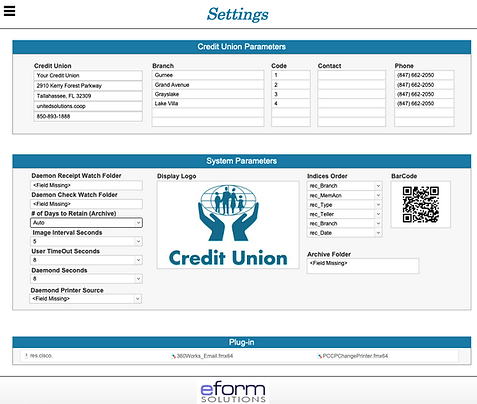
OnCore Receipts will recognize the teller as a drive-thru teller and either print two copies of the receipt or allow the teller to request the member sign the receipt on their mobile phone.
Dashboard

Recognizing the teller as a "back office" teller, OnCore Receipts 1.3may request a signature on the member's mobile phone, and email or text the completed receipt to the member.
The Member Kiosk
OnCore Receipts provides a real-time log of all receipts processed for the business day. From that log, the receipt may be displayed, printed, e-mailed to texted. At the end of the day, the receipt records are moved to the Archive table, where they may be moved to the credit unions optical archive.
Advertising & Welcome

OnCore Receipts will recognize the teller as a drive-thru teller and either print two copies of the receipt or allow the teller to request the member sign the receipt on their mobile phone.
Receipt Delivery

Recognizing the teller as a "back office" teller, OnCore Receipts 1.3may request a signature on the member's mobile phone, and email or text the completed receipt to the member.
Sign Receipt

OnCore Receipts will recognize the teller as a drive-thru teller and either print two copies of the receipt or allow the teller to request the member sign the receipt on their mobile phone.
Request for Survey

Recognizing the teller as a "back office" teller, OnCore Receipts 1.3may request a signature on the member's mobile phone, and email or text the completed receipt to the member.
Survey Questions

OnCore Receipts will recognize the teller as a drive-thru teller and either print two copies of the receipt or allow the teller to request the member sign the receipt on their mobile phone.
Thanks & Finish Up

Recognizing the teller as a "back office" teller, OnCore Receipts 1.3may request a signature on the member's mobile phone, and email or text the completed receipt to the member.
Kiosk Options
We offers several different types and styles of Kiosks.
Each are secure, metal construction designed for commercial duty.


